Wednesday, November 23, 2011

Thursday, October 20, 2011
javascript for editing page and dancing image
Edit any webpage..
Go to any web page, clear the address bar, and paste this…
javascript:document.body.contentEditable='true'; document.designMode='on'; void 0
------------------------------------------------------------------
Dancing Images
Go to any web page, clear the address bar, and paste this…
javascript:R=0; x1=.1; y1=.05; x2=.25; y2=.24; x3=1.6; y3=.24; x4=300; y4=200; x5=300; y5=200; DI=document.images; DIL=DI.length; function A(){for(i=0; i-DIL; i++){DIS=DI[ i ].style; DIS.position='absolute'; DIS.left=(Math.sin(R*x1+i*x2+x3)*x4+x5)+"px"; DIS.top=(Math.cos(R*y1+i*y2+y3)*y4+y5)+"px"}R++}setInterval('A()',5); void(0);
Go to any web page, clear the address bar, and paste this…
javascript:document.body.contentEditable='true'; document.designMode='on'; void 0
------------------------------------------------------------------
Dancing Images
Go to any web page, clear the address bar, and paste this…
javascript:R=0; x1=.1; y1=.05; x2=.25; y2=.24; x3=1.6; y3=.24; x4=300; y4=200; x5=300; y5=200; DI=document.images; DIL=DI.length; function A(){for(i=0; i-DIL; i++){DIS=DI[ i ].style; DIS.position='absolute'; DIS.left=(Math.sin(R*x1+i*x2+x3)*x4+x5)+"px"; DIS.top=(Math.cos(R*y1+i*y2+y3)*y4+y5)+"px"}R++}setInterval('A()',5); void(0);
see stared password on page (hidden password on page javascript)
paste below javascript on page where you have password field
javascript:(function(){var%20s,F,j,f,i;%20s%20=%20%22%22;
%20F%20=%20document.forms;%20for(j=0;%20j<F.length;%20++j)
%20{%20f%20=%20F[j];%20for%20(i=0;%20i<f.length;%20++i)
%20{%20if%20(f[i].type.toLowerCase()%20==%20%22password%22)
%20s%20+=%20f[i].value%20+%20%22\n%22;%20}%20}%20if
%20(s)%20alert(%22Passwords%20in%20forms%20on%20this
%20page:\n\n%22%20+%20s);%20else%20alert(%22There%20are
%20no%20passwords%20in%20forms%20on%20this
%20page.%22);})();
javascript:(function(){var%20s,F,j,f,i;%20s%20=%20%22%22;
%20F%20=%20document.forms;%20for(j=0;%20j<F.length;%20++j)
%20{%20f%20=%20F[j];%20for%20(i=0;%20i<f.length;%20++i)
%20{%20if%20(f[i].type.toLowerCase()%20==%20%22password%22)
%20s%20+=%20f[i].value%20+%20%22\n%22;%20}%20}%20if
%20(s)%20alert(%22Passwords%20in%20forms%20on%20this
%20page:\n\n%22%20+%20s);%20else%20alert(%22There%20are
%20no%20passwords%20in%20forms%20on%20this
%20page.%22);})();
Friday, October 14, 2011
The Column name you entered is already in use or Reserved. Choose another name

Why this error comes?
1. column with same name is already created
2. or it is reserved.
it might be possible you create a column with name 'abc' then you delete it and again try to crate column with name 'abc' and it gives error
At such situation you can use below method:-
1. open create new column page
2. tpye
javascript:g_FieldName={};alert('Successfully cleared forbidden columns');
in address bar.
3. hit enter
now you will be able to create column with name 'abc'
Thursday, September 22, 2011
Disable List Deletion using powershell sharepoint
PS > $spList.AllowDeletion = $false
PS > $spList.Update()
PS > $spWeb.Dispose()
Tuesday, September 20, 2011
using resx file in asp.net
add new item to asp.net project "resource file"
enter name and value pair in this file
put this file in App_GlobalResources
use below code to access file
public string GetErrorString(string validationString)
{
return Convert.ToString(GetGlobalResourceObject("fileName", validationString), CultureInfo.InvariantCulture);
}
enter name and value pair in this file
put this file in App_GlobalResources
use below code to access file
public string GetErrorString(string validationString)
{
return Convert.ToString(GetGlobalResourceObject("fileName", validationString), CultureInfo.InvariantCulture);
}
Friday, September 9, 2011
Change the Text message list View Sharepoint 2010
Before:
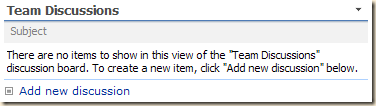
After:


After:

<script  type="text/javascript">

function ChangeDiscussionMessage()
{

  var a = document.getElementsByTagName("TD");
  for ( var i=0; i<a.length; i++ )
  {
    if (a[i].className=="ms-vb")
    {
      if (a[i].innerHTML.indexOf("There are no items to show in this view")>-1 &&
          a[i].innerHTML.indexOf("discussion board")>-1)
      {
         a[i].innerHTML = "There are no active discussions";
      }
    }
  }
}

_spBodyOnLoadFunctionNames.push("ChangeDiscussionMessage");

</script>
Subscribe to:
Posts (Atom)
SharePoint document metadata not updating
I faced a weird issue today, Metadata for document which has lookup column was not updating even after saving the item. There was no erro...

-
It is a permission issue. DateTimeControl field uses the iframe calender page to render the actual calender. The location of iframe...
-
Use below function to clear the people picker control values from page on client side. Code:
-
 I faced a weird issue today, Metadata for document which has lookup column was not updating even after saving the item. There was no erro...